









xsukax AES-256 File/Folder Encryption/Decryption Tool
xsukax AES-256 File/Folder Encryption Tool: Comprehensive Security Guide
File security is critical in today’s digital landscape. This guide explores the xsukax AES-256 Encryption Tool, a Python-based solution that provides military-grade encryption for files and folders while remaining accessible to users at all technical levels.
Understanding the Tool
The xsukax AES-256 Encryption Tool is an open-source Python application that secures your sensitive data through advanced cryptographic methods. It supports both graphical (GUI) and command-line (CLI) interfaces, making it versatile for different user preferences and automation needs.
Primary Capabilities
The tool offers four essential operations:
File Operations: Encrypt individual files into secure .enc formats and decrypt them back to their original state with preserved filenames.
Folder Operations: Archive entire directory structures using TAR format and encrypt them into single protected files, then decrypt and extract while maintaining the complete folder hierarchy.
Key Security Features
Encryption Standards
The application implements AES-256-CBC encryption, considered military-grade security. It uses PBKDF2-HMAC-SHA256 for key derivation with 100,000 iterations, significantly increasing resistance against brute-force attacks.
Each encryption operation generates unique cryptographic elements: a 16-byte random salt and a 16-byte initialization vector (IV), ensuring that identical files encrypted with the same password produce different outputs.
Password Security
The tool never stores passwords in files or command history. All password entries use hidden input methods (getpass), and passwords are processed entirely in memory. The built-in password strength analyzer provides real-time feedback with specific suggestions for improvement, helping users create stronger passphrases.
Installation and Setup
System Requirements
The tool requires Python 3.7 or higher (Python 3.9+ recommended) and a single external dependency: the cryptography library.
To check if dependencies are installed:
python xsukax-enc-dec.py --check-depsInstalling Dependencies
pip install cryptographyGetting the Application
git clone https://github.com/xsukax/xsukax-AES-256-File-Folder-Encryptor-Decryptor
cd xsukax-AES-256-File-Folder-Encryptor-Decryptor
Linux users may need to install tkinter for GUI support:
# Ubuntu/Debian
sudo apt-get install python3-tk

# Fedora/RHEL
sudo dnf install python3-tkinter
Using the Graphical Interface
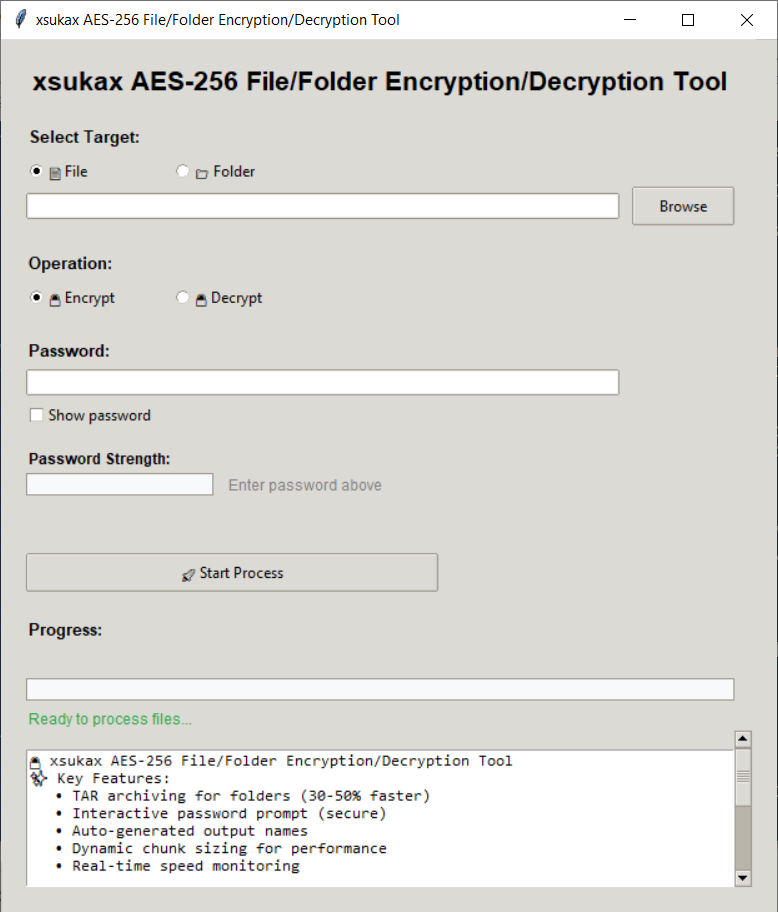
Launch the GUI by running the script without arguments:
python xsukax-enc-dec.pyThe GUI provides an intuitive interface with visual file selection dialogs, real-time password strength indicators with color coding, live progress bars showing operation stages, detailed logs displaying performance metrics, and automatic output path generation.
Command-Line Usage
The CLI offers powerful automation capabilities with interactive password prompts for enhanced security.
Basic Syntax
python xsukax-enc-dec.py [-e | -d] input [-o output] [options]Essential Commands
Encrypting Files:
# Basic file encryption (creates file.txt.enc)
python xsukax-enc-dec.py -e file.txt

# Encrypt with custom output
python xsukax-enc-dec.py -e sensitive.doc -o backup.enc

# Encrypt with password strength validation
python xsukax-enc-dec.py -e document.pdf --check-strength
Decrypting Files:
# Basic file decryption (creates original file)
python xsukax-enc-dec.py -d file.txt.enc

# Decrypt with custom output location
python xsukax-enc-dec.py -d backup.enc -o restored.doc
Folder Operations:
# Encrypt entire folder (creates MyFolder.enc)
python xsukax-enc-dec.py -e MyFolder

# Decrypt folder (extracts to original structure)
python xsukax-enc-dec.py -d MyFolder.enc

# Handle folders with spaces (use quotes)
python xsukax-enc-dec.py -e "My Documents"
Advanced Options:
# Force overwrite without prompting
python xsukax-enc-dec.py -e data.xlsx -f

# Quiet mode for minimal output
python xsukax-enc-dec.py -e large_file.iso -q

# Explicitly specify input type
python xsukax-enc-dec.py -d archive.enc --file
Technical Implementation
Performance Optimization
The tool dynamically adjusts processing chunk sizes based on file dimensions: 64KB chunks for files under 1MB, 256KB for files under 100MB, 512KB for files under 1GB, and 1MB chunks for larger files. This adaptive approach maximizes throughput while managing memory efficiently.
For folder operations, the tool uses TAR archiving without compression. Since AES encryption provides security and naturally produces incompressible output, skipping compression saves 30-50% processing time compared to compressed formats like ZIP.
File Structure
Encrypted files follow a consistent format: the first 16 bytes contain the salt, the next 16 bytes store the initialization vector, followed by the encrypted data with PKCS7 padding. This structure allows the decryption process to extract the necessary cryptographic parameters before processing the encrypted payload.
Operation Workflow
During file encryption, the tool generates random cryptographic parameters, derives a 256-bit key from your password using PBKDF2, streams the file through the AES-256-CBC cipher, and writes output to a temporary file before safely renaming it—protecting against interruption.
For folder encryption, the process involves two stages: first creating an uncompressed TAR archive that preserves the complete directory structure including empty folders, then encrypting this archive using the same streaming approach as file encryption. Progress tracking displays both stages separately for transparency.
Best Practices for Secure Usage
Creating Strong Passwords
Effective passwords should be at least 12 characters long and combine uppercase letters, lowercase letters, numbers, and special symbols. Avoid dictionary words, personal information, and common patterns. The tool’s password strength checker provides specific feedback to help you create robust passphrases.
Data Management
Always maintain encrypted backups in separate locations. Before encrypting important data, test the encryption and decryption process with sample files to ensure everything works as expected. Store your encryption passwords securely using a reputable password manager—losing the password means permanently losing access to your encrypted data.
Platform Considerations
On Windows, PowerShell handles paths more reliably than Command Prompt, especially for folders containing spaces. Use double quotes around paths with spaces and avoid trailing backslashes. On Linux systems, verify file permissions for both input and output locations. macOS users may need to grant disk access permissions when prompted.
Practical Use Cases
Personal Data Protection
Encrypt sensitive documents like financial records, legal documents, and personal identification files before storing them in cloud services or external drives. This adds a crucial security layer beyond what cloud providers offer.
Professional Applications
Developers can encrypt source code repositories and configuration files containing API keys or credentials. Businesses can secure confidential client data, internal reports, and proprietary information during storage or transmission.
Backup Security
Use the tool to encrypt complete backup archives. By encrypting folder structures, you can protect entire project directories, photo libraries, or document collections while maintaining their organization.
Troubleshooting Common Issues
Permission Problems
If you encounter permission errors, ensure you have write access to the target directory. On Windows, try running as Administrator for system folders, or choose directories within your user profile. On Linux, use appropriate permissions or sudo when necessary.
Password Verification Failures
If decryption fails with “invalid encrypted file format,” verify you’re entering the correct password. Even minor differences (like extra spaces or incorrect case) will prevent decryption. If you’re certain about the password, check that the file wasn’t corrupted during transfer by comparing file sizes and checksums.
Performance for Large Files
Files exceeding 10GB require several minutes for processing. Ensure you have at least twice the file size available as free disk space—the tool needs room for both the original and encrypted versions. Monitor the progress bar to track operation status and performance metrics.
Creating Standalone Executables
For distribution or use on systems without Python, you can package the application using PyInstaller:
pip install pyinstaller
pyinstaller --onefile xsukax-enc-dec.py
This creates a single executable file containing all dependencies, making the tool portable and easy to share while maintaining security.
Understanding Encryption Strength
The combination of AES-256 encryption with PBKDF2-HMAC-SHA256 key derivation provides robust security. AES-256 uses 256-bit keys, offering 2^256 possible combinations—computationally infeasible to brute force with current technology. The 100,000 PBKDF2 iterations significantly slow down password-guessing attacks while remaining fast enough for legitimate use.
Each encrypted file’s unique salt and IV prevent identical files from producing identical encrypted output, protecting against pattern analysis attacks. The CBC (Cipher Block Chaining) mode ensures that each block of encrypted data depends on previous blocks, further strengthening security.
Comparing Archive Methods
The tool’s shift to TAR instead of ZIP for folder operations deserves explanation. Since encryption produces effectively random output that cannot be compressed further, applying compression before encryption wastes CPU cycles without reducing file size. TAR archiving preserves directory structures and file metadata efficiently without compression overhead, resulting in 30-50% faster operations for folder encryption.
Contributing and Support
As an open-source project, the tool welcomes contributions through GitHub. Users can report issues, suggest features, or submit code improvements. The project repository includes comprehensive documentation and example usage patterns for reference.
Tool Information
Version: 4.0
License: Open Source
Platform: Cross-platform (Windows, macOS, Linux)
Repository: GitHub – xsukax-AES-256-File-Folder-Encryptor-Decryptor